

Description
G Suite Training Chrome Extension
Is the G Suite Training extension still available?
The G Suite Training Chrome extension was retired on October 1, 2019. It is no longer accessible or functional.
Can I still access the training videos?
Yes, the training content is now hosted in the Google Workspace Learning Center at https://support.google.com/a/users. You can access all training materials there.
Is the extension safe to install?
The extension was developed by Google and adhered to Chrome’s security policies at the time of release. However, since it has been retired, it is no longer available for installation.
What should I do now that the extension is no longer available?
Users are encouraged to visit the Google Workspace Learning Center for updated training resources, tutorials, and support materials.
Does the extension require an internet connection?
Yes, the extension required an active internet connection to load training videos and access content hosted on Google’s servers.
- Access to G Suite training videos via Chrome extension
- Quick in-browser learning for Google Workspace tools
- Designed for workplace productivity and onboarding
- Integrated with Google’s official support ecosystem
- Extension has been retired and is no longer functional
- No longer supported or updated by Google
- Requires Chrome browser to function
- Content is now hosted elsewhere
Overview
The G Suite Training Chrome extension was designed to deliver a streamlined learning experience for users navigating Google’s suite of productivity tools. Its primary purpose was to provide on-demand access to training videos directly within the Chrome browser, allowing users to learn essential features without leaving their workspace. This tool addressed common challenges in onboarding new employees and supporting existing users in mastering tools like Gmail, Drive, Docs, Sheets, and Meet. It was especially useful for organizations seeking to improve digital literacy across teams without relying on external training platforms.
The target audience included professionals, educators, and administrators managing Google Workspace environments. While the extension was developed by Google, the developer’s broader background is not detailed in the provided information. Real-world usage scenarios included quick reference during onboarding, self-paced learning during work hours, and troubleshooting common workflow issues through video guidance. The extension’s integration with Chrome made it a convenient option for users already operating within the Google ecosystem.
With the retirement of the extension on October 1, 2019, users are no longer able to install or use it. The developer did not provide additional system requirements or performance data. The extension’s functionality was limited to content delivery via video and browser integration, with no offline capabilities or additional features beyond training access.
Key Features & Capabilities
The G Suite Training extension offered a focused set of capabilities centered around educational content delivery. It provided direct access to a curated library of training videos, enabling users to learn core features of Google Workspace tools in real time. Each video was designed to walk users through specific tasks, such as creating shared documents, managing calendar events, or setting up email filters. The in-browser delivery model ensured minimal setup and immediate usability.
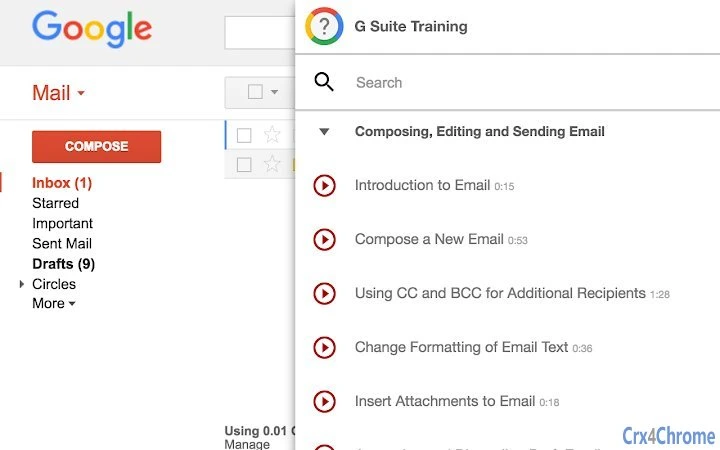
Navigation was simple and intuitive, with a clean interface that displayed video thumbnails and topic categories. Users could search for specific topics or browse by tool type, allowing for efficient learning. The extension’s workflow was optimized for quick reference, making it ideal for users who needed immediate help during daily tasks. For example, a new team member could watch a short video on file sharing in Drive while preparing a project document.
Since the extension was built for Chrome, it leveraged the browser’s capabilities to stream videos securely and efficiently. The developer did not specify technical details about resource usage, streaming quality, or data handling. However, based on standard Chrome extension behavior, the extension likely used minimal system resources during playback. The content was hosted on Google’s servers, ensuring consistent access and up-to-date material.
User Interface, Workflow & Performance
The user interface of the G Suite Training extension was designed for simplicity and efficiency. It featured a compact sidebar or popup panel within the Chrome browser, displaying video thumbnails, topic categories, and search functionality. The layout prioritized ease of access, allowing users to find relevant content with minimal clicks. Navigation was straightforward, with clearly labeled sections and intuitive icons.
Workflow efficiency was a key strength. Users could launch the extension with a single click, view the video library, and begin watching tutorials without switching applications. This seamless integration into the user’s existing browser environment reduced friction and supported just-in-time learning. The extension did not require installation of additional software or plugins, further streamlining the experience.
Performance observations are based on general software behavior patterns. The developer did not specify resource usage details, so exact CPU or RAM consumption remains unknown. However, as a lightweight browser extension, it likely had minimal impact on system performance during video playback. Stability was expected to be high, given its integration with Chrome’s established extension framework. No offline functionality was available, as all content required an active internet connection.
Compatibility & System Requirements
The G Suite Training extension was designed exclusively for the Chrome browser. It was compatible with all systems running Chrome, including Windows, macOS, and Chrome OS. The extension’s installation size was 2.8 MB, indicating a lightweight footprint. The developer did not specify additional hardware or software requirements beyond the Chrome browser.
Exact system requirements were not listed. Compatibility information was partially provided, with the primary platform being Chrome. The extension was not intended for use on other browsers or operating systems outside of Chrome’s supported environments. Since the extension has been retired, no current compatibility status can be verified.
Pros and Cons
- Quick access to official Google training videos
- Minimal setup and easy to use
- Integrated directly into the Chrome browser
- Content aligned with Google Workspace best practices
- Extension has been retired and is no longer functional
- No longer supported or updated by Google
- Requires an internet connection to function
- Content is now hosted on a different platform
Final Thoughts + CTA
While the G Suite Training Chrome extension once offered a convenient way to access essential productivity training, its retirement marks the end of its lifecycle. Users are now directed to the Google Workspace Learning Center for all training materials. The extension’s legacy lies in its role as an early example of browser-integrated learning tools, demonstrating the value of contextual, on-demand education.
For current users, the best path forward is to transition to the official Learning Center. The content remains comprehensive, up-to-date, and freely available. Professionals, educators, and administrators who rely on Google Workspace tools will benefit most from the continued availability of these resources.
Download G Suite Training now
Guides & Tutorials for Deprecated) G Suite Training Extension for Chrome
How to install Deprecated) G Suite Training Extension for Chrome
- Click the Preview / Download button above.
- Once redirected, accept the terms and click Install.
- Wait for the Deprecated) G Suite Training Extension for Chrome download to finish on your device.
How to use Deprecated) G Suite Training Extension for Chrome
This software is primarily used for its core features described above. Open the app after installation to explore its capabilities.
User Reviews for Deprecated) G Suite Training Extension for Chrome 0
No reviews found





